告别折腾:Windows 一键安装 Claude Code(国内可用)
本文最后更新于 2026-03-06,文章内容可能已经过时。
免科学上网环境 / 免手动装 Node / 免手动装 Git
想在 Windows 上跑 Claude Code,光配环境就能把人搞崩。不是在说玩笑:
得有科学上网环境
得手动装 Node.js 和 npm
得装 Git 并配环境变量
一旦出错,根本不知道从哪查
为了绕开这些,我写了一套 PowerShell 自动化脚本,把上面的事情全部包掉。
脚本做了什么
自动安装 winget
电脑没有微软包管理器也没关系,脚本会自己去微软官网拉取并静默安装。
全自动装 Node.js 和 Git
不需要点"下一步"。如果 GitHub 被墙导致 Git 下载失败,脚本自动切阿里淘宝镜像继续。Git 安装包大概 60MB,国内镜像偶尔要等几分钟,窗口开着别关就行。
接驳国内网络
npm 镜像自动切淘宝源,API 地址内置阿里云百炼代理,默认配 kimi-k2.5 模型,不需要科学上网环境。
装完不用重启
脚本自动把路径注入当前命令行,直接可用。
跳过登录引导
直接改底层配置文件,跳过网页授权和新手引导。
绕过 Windows 策略拦截
自动禁用会报错的 .ps1 脚本,改用 .cmd 启动。
怎么用(两步)
第一步:填入你的 API Key
在下方脚本里找到这行:
$API_KEY = "REPLACE_WITH_YOUR_API_KEY"把引号里的内容换成你自己的 Key,比如阿里云百炼的 Key。

第二步:以管理员身份运行
1. 开始菜单搜索 PowerShell,选「以管理员身份运行」(必须,因为要装软件)

2. 把改好的脚本整段粘贴进去,回车

进度条从 [0/10] 跑到 [10/10],中途记得让安全软件放行。看到以下内容就代表已安装成功:
完成。请关闭并重新打开 PowerShell启动
重新开一个普通 PowerShell 窗口,输入:
claude
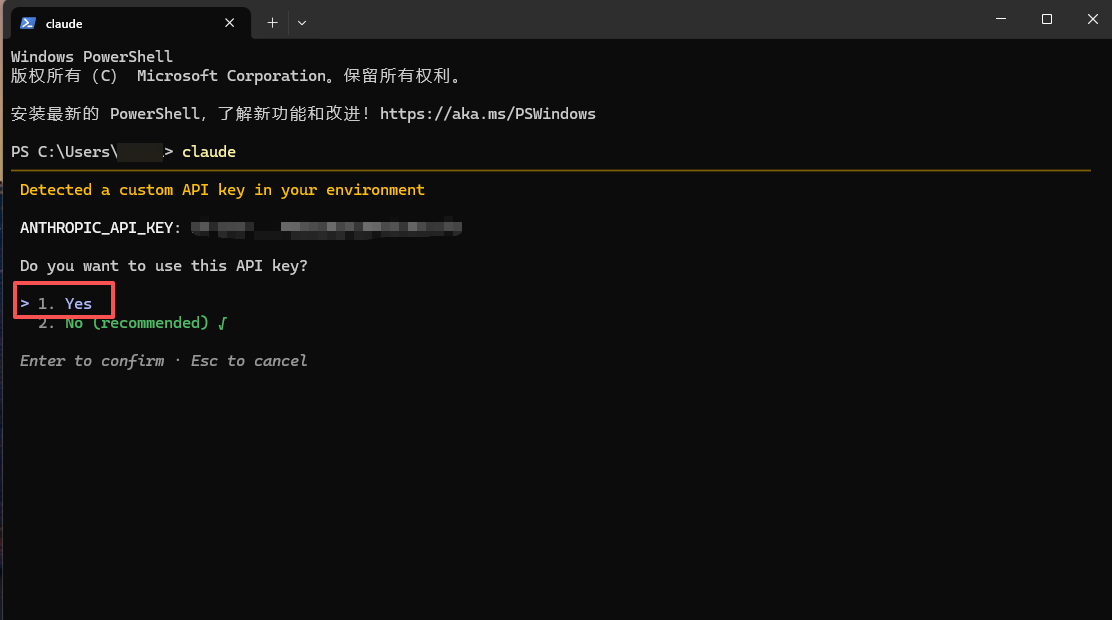
选 Yes, I trust this folder,进入界面,可以用了。

完整脚本
⚠️ 运行前务必把
REPLACE_WITH_YOUR_API_KEY换成你的真实 API Key
$ErrorActionPreference = "Stop"
[Net.ServicePointManager]::SecurityProtocol = [Net.SecurityProtocolType]::Tls12

# 【注意】请将下面的 REPLACE_WITH_YOUR_API_KEY 替换为你真实的 API Key!
$BASE_URL = "https://coding.dashscope.aliyuncs.com/apps/anthropic"
$MODEL = "kimi-k2.5"
$API_KEY = "REPLACE_WITH_YOUR_API_KEY"

if ([string]::IsNullOrWhiteSpace($API_KEY) -or $API_KEY -eq "REPLACE_WITH_YOUR_API_KEY") {
  throw "请先把 API_KEY 改成真实值。"
}

function Get-WingetExe {
  $cmd = Get-Command winget -ErrorAction SilentlyContinue
  if ($cmd) { return $cmd.Source }

  $pkg = Get-AppxPackage -Name Microsoft.DesktopAppInstaller -ErrorAction SilentlyContinue |
    Sort-Object Version -Descending | Select-Object -First 1
  if ($pkg) {
    $exe = Join-Path $pkg.InstallLocation "winget.exe"
    if (Test-Path $exe) { return $exe }
  }
  return $null
}

$winget = Get-WingetExe
if (-not $winget) {
  Write-Host "[0/10] 未检测到 winget,开始安装..."
  $vclibs = Join-Path $env:TEMP "Microsoft.VCLibs.x64.14.00.Desktop.appx"
  $appins = Join-Path $env:TEMP "Microsoft.DesktopAppInstaller.msixbundle"

  Invoke-WebRequest -Uri "https://aka.ms/Microsoft.VCLibs.x64.14.00.Desktop.appx" -OutFile $vclibs
  try { Add-AppxPackage -Path $vclibs } catch {}

  Invoke-WebRequest -Uri "https://aka.ms/getwinget" -OutFile $appins
  Add-AppxPackage -Path $appins

  Start-Sleep -Seconds 2
  $winget = Get-WingetExe
}
if (-not $winget) { throw "winget 安装失败,请检查系统策略后重试。" }

Write-Host "[1/10] 修复 winget 源..."
try { & $winget source remove msstore | Out-Null } catch {}
& $winget source update | Out-Null

Write-Host "[2/10] 安装 Node.js LTS..."
& $winget install -e --id OpenJS.NodeJS.LTS --source winget --accept-source-agreements --accept-package-agreements

Write-Host "[3/10] 安装 Git for Windows..."
& $winget install -e --id Git.Git --source winget --accept-source-agreements --accept-package-agreements
$gitInstalled = (Test-Path "C:\Program Files\Git\cmd\git.exe") -or (Test-Path "C:\Program Files\Git\bin\git.exe") -or (Get-Command git -ErrorAction SilentlyContinue)
if (-not $gitInstalled) {
  Write-Host "Winget 下载/安装 Git 失败 (可能因为 Github 被墙),尝试从国内镜像下载..."
  Write-Host "由于 Git 安装包较大 (约 60MB),国内镜像下载可能需要 3~5 分钟,请不要关闭窗口,耐心等待..."
  $gitInstaller = Join-Path $env:TEMP "Git-Setup.exe"
  # 使用阿里的npm镜像站下载 Git Windows 安装包
  Invoke-WebRequest -Uri "https://npmmirror.com/mirrors/git-for-windows/v2.44.0.windows.1/Git-2.44.0-64-bit.exe" -OutFile $gitInstaller
  Write-Host "下载完成,正在静默安装 Git..."
  Start-Process -FilePath $gitInstaller -ArgumentList "/VERYSILENT /NORESTART /NOCANCEL /SP- /CLOSEAPPLICATIONS /RESTARTAPPLICATIONS /COMPONENTS=""icons,ext\reg\shellhere,assoc,assoc_sh""" -Wait -NoNewWindow
}

Write-Host "[4/10] 刷新当前会话 PATH..."
$paths = @(
  "$env:ProgramFiles\nodejs",
  "$env:LOCALAPPDATA\Programs\nodejs",
  "C:\Program Files\Git\bin",
  "C:\Program Files\Git\cmd",
  "$env:APPDATA\npm"
)
foreach ($p in $paths) {
  if ((Test-Path $p) -and ($env:Path -notlike "*$p*")) { $env:Path += ";$p" }
}

$npmCmd = (Get-Command npm.cmd -ErrorAction SilentlyContinue).Source
if (-not $npmCmd) {
  foreach ($c in @("$env:ProgramFiles\nodejs\npm.cmd", "$env:LOCALAPPDATA\Programs\nodejs\npm.cmd")) {
    if (Test-Path $c) { $npmCmd = $c; break }
  }
}
if (-not $npmCmd) { throw "找不到 npm.cmd,请重开 PowerShell 后再执行一次。" }

Write-Host "[5/10] 安装 Claude Code..."
& $npmCmd config set registry https://registry.npmmirror.com | Out-Null
& $npmCmd config set fund false | Out-Null
& $npmCmd config set audit false | Out-Null
& $npmCmd i -g "@anthropic-ai/claude-code" --registry=https://registry.npmmirror.com

Write-Host "[6/10] 配置 Git Bash..."
$bashExe = @(
  "C:\Program Files\Git\bin\bash.exe",
  "C:\Program Files\Git\usr\bin\bash.exe"
) | Where-Object { Test-Path $_ } | Select-Object -First 1
if (-not $bashExe) { throw "未找到 Git Bash (bash.exe)。" }

Write-Host "[7/10] 写入环境变量..."
$vars = @{
  ANTHROPIC_BASE_URL = $BASE_URL
  ANTHROPIC_API_KEY = $API_KEY
  ANTHROPIC_MODEL = $MODEL
  CLAUDE_CODE_GIT_BASH_PATH = $bashExe
}
foreach ($k in $vars.Keys) {
  [Environment]::SetEnvironmentVariable($k, $vars[$k], "User")
  Set-Item "Env:$k" $vars[$k]
}

Write-Host "[8/10] 写入 ~/.claude.json ..."
$cfgPath = Join-Path $env:USERPROFILE ".claude.json"
if (Test-Path $cfgPath) {
  try { $cfg = Get-Content $cfgPath -Raw | ConvertFrom-Json } catch { $cfg = [pscustomobject]@{} }
} else {
  $cfg = [pscustomobject]@{}
}
if ($cfg.PSObject.Properties.Name -contains "hasCompletedOnboarding") {
  $cfg.hasCompletedOnboarding = $true
} else {
  $cfg | Add-Member -NotePropertyName "hasCompletedOnboarding" -NotePropertyValue $true
}
$cfg | ConvertTo-Json -Depth 100 | Set-Content -Path $cfgPath -Encoding UTF8

Write-Host "[9/10] 修复 PowerShell 直接 claude 启动..."
$ps1Shim = Join-Path $env:APPDATA "npm\claude.ps1"
$ps1Bak = Join-Path $env:APPDATA "npm\claude.ps1.disabled"
if (Test-Path $ps1Shim) {
  if (Test-Path $ps1Bak) { Remove-Item $ps1Bak -Force }
  Rename-Item $ps1Shim "claude.ps1.disabled" -Force
}

Write-Host "[10/10] 验证..."
$claudeCmd = Join-Path $env:APPDATA "npm\claude.cmd"
if (-not (Test-Path $claudeCmd)) {
  $claudeCmd = (Get-Command claude.cmd -ErrorAction SilentlyContinue).Source
}
if (-not $claudeCmd) { throw "未找到 claude.cmd。" }

node -v
& $npmCmd -v
& $claudeCmd --version

Write-Host ""
Write-Host "完成。请关闭并重新打开 PowerShell,然后运行:"
Write-Host "claude --version"
Write-Host "claude"
注意事项
之前自己折腾过环境导致报错的,建议先卸载 Node.js 和旧版 Claude Code 再跑这个脚本。脚本默认用阿里百炼 API,配了 kimi-k2.5。百炼还有通义千问等其他模型,改脚本开头的 $MODEL 变量就能切换。有自己的中转 API 的话,改 $BASE_URL 和 $MODEL 即可。